
Release 2026.5.2 "Old Fashioned"
Notes: This release consists of 5 New features and Improvements. Use the page navigation section on the top left of this screen to jump between the features you'd like to read about.
**This release will NOT require a handheld update**
**This release WILL require a handheld update to version 2026.5.2**
If you would like any additional information or help setting up any of these new features, please contact support at:
Support@ingageit.com or call (612) 861-5277
New Features
1. OLO Suggestive Selling
Improvements
2.Reports AbilityCan Now Be Emailed On Demand
- Reports can now be emailed directly from the report screen without needing to wait for the report to generate or create a scheduled report.
- Selecting Email Report will queue the report request and automatically email it once generation is complete. This is especially helpful for larger reports that may take longer to load.
- After clicking the button, a popup window will appear to enter recipients. The email address of the user currently logged into Backoffice will automatically populate, and additional email addresses can be added using a semicolon ( ; ) separator.
3. New Handheld Usage Report
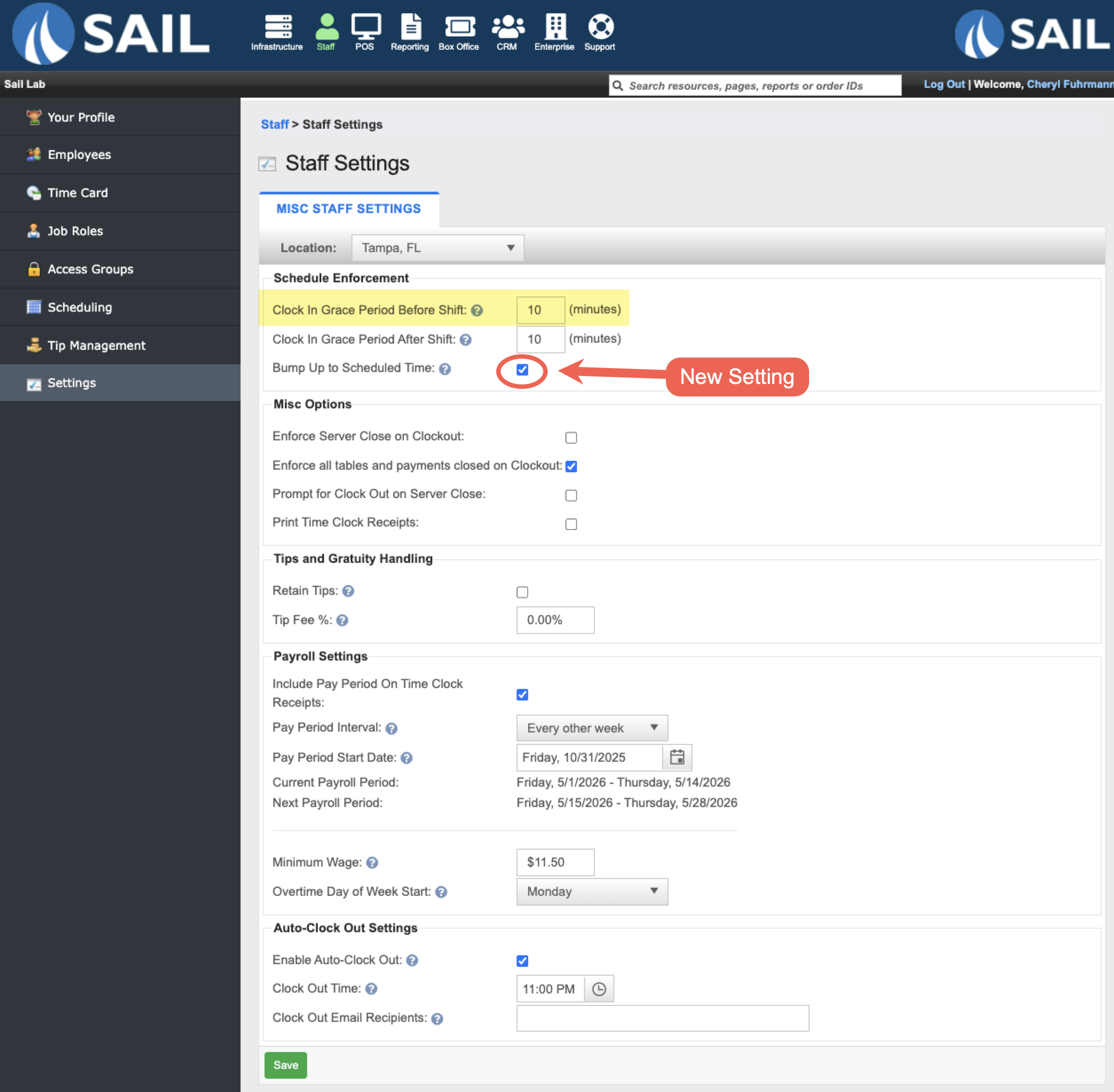
4. Optional Prompt Added for Early Clock-Ins
- A new setting called "Bump up to scheduled time" has been added to the Clock In Grace Period Before Shift option.
- When enabled, employees who clock in during the allowed early clock-in grace period will be prompted to choose whether to clock in at their scheduled start time instead of their actual clock-in time.
- For example, if an employee is scheduled for 4:00 PM and the early clock-in grace period is set to 10 minutes, they could attempt to clock in at 3:55 PM. Sail would then ask if they would like to be clocked in at their scheduled 4:00 PM start time.
- Selecting Yes clocks them in at their scheduled shift time, while selecting No cancels the clock-in attempt.
- If this setting is disabled, that same employee clocking in at 3:55 PM would simply be clocked in at 3:55 PM with no prompt displayed.
5. Items and modifier items now print in order on customer receipts
6. Backoffice Refresh: CRM Tab
Fixes
- Fixed an issue where .jpeg images could not be uploaded for carousel media.
- Resolved an issue where the “Requires Manager” setting was not saving correctly on discounts.
- Fixed a problem where the duplicate check during gift card imports incorrectly reported duplicates even when none existed.
- Online Ordering checkpoints now properly respect the location’s closed schedule.
- Resolved an issue where auto logout could error if a dialog window was open.
- Fixed an issue where quantity counts were not decreasing correctly when modifiers were included.
- Online Ordering inventory now updates properly when item quantities change.
- Corrected an issue that could occur when ungrouping a split item.
- Improved overall speed and responsiveness when working with modifiers.
- Automatic gratuity now displays correctly on credit card vouchers.
- Fixed an issue where running a second server close could cause duplicate tips to appear on payroll reports.