
Release 2026.7.2 "Trojan Horse"
Notes: This release consists of 5 New features and Improvements. Use the page navigation section on the top left of this screen to jump between the features you'd like to read about.
**This release will NOT require a handheld update**
**This release WILL require a handheld update to version 2026.7.2**
If you would like any additional information or help setting up any of these new features, please contact support at:
Support@ingageit.com or call (612) 861-5277
Improvements
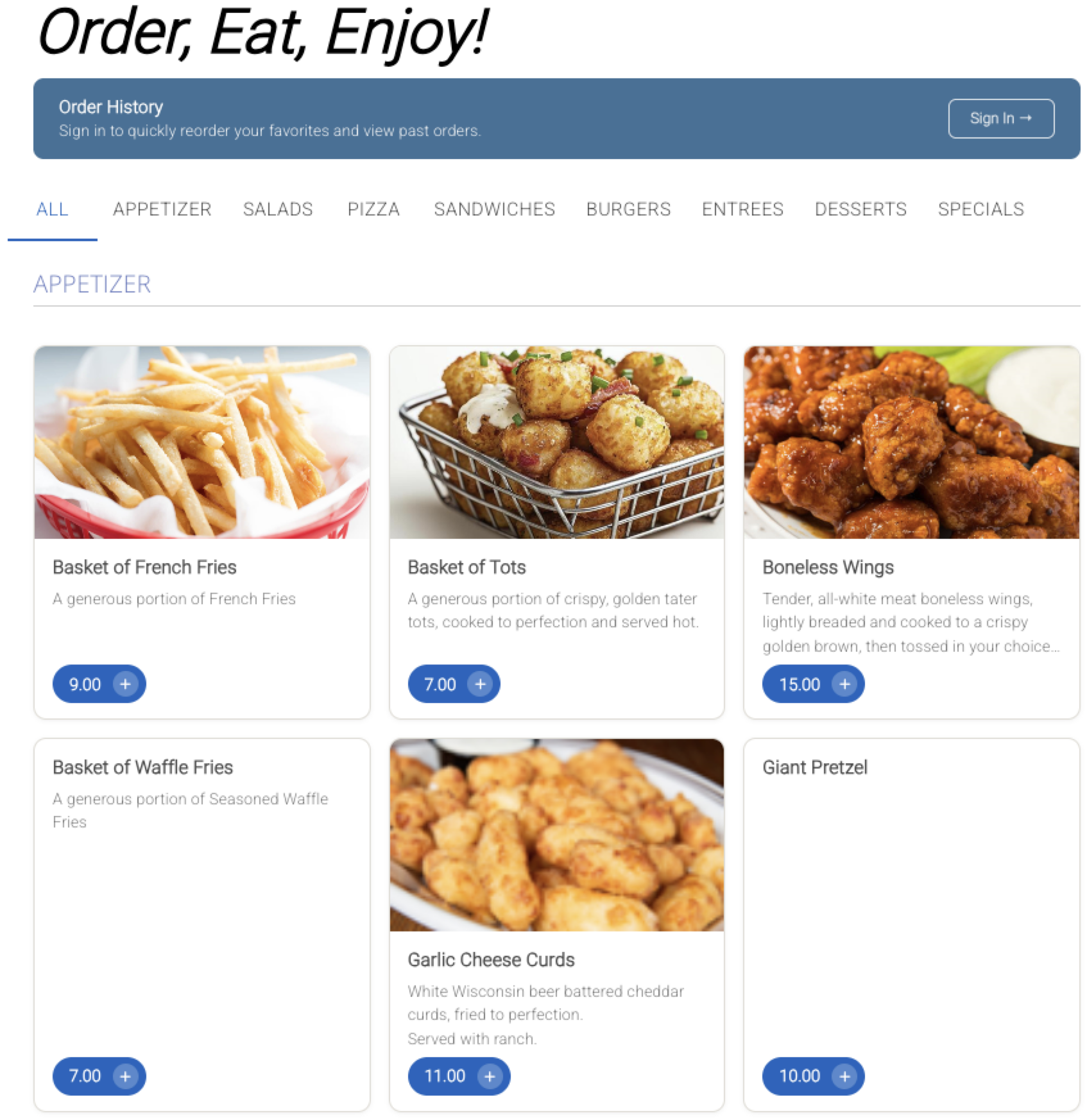
1. Two New Online Ordering Menu Themes
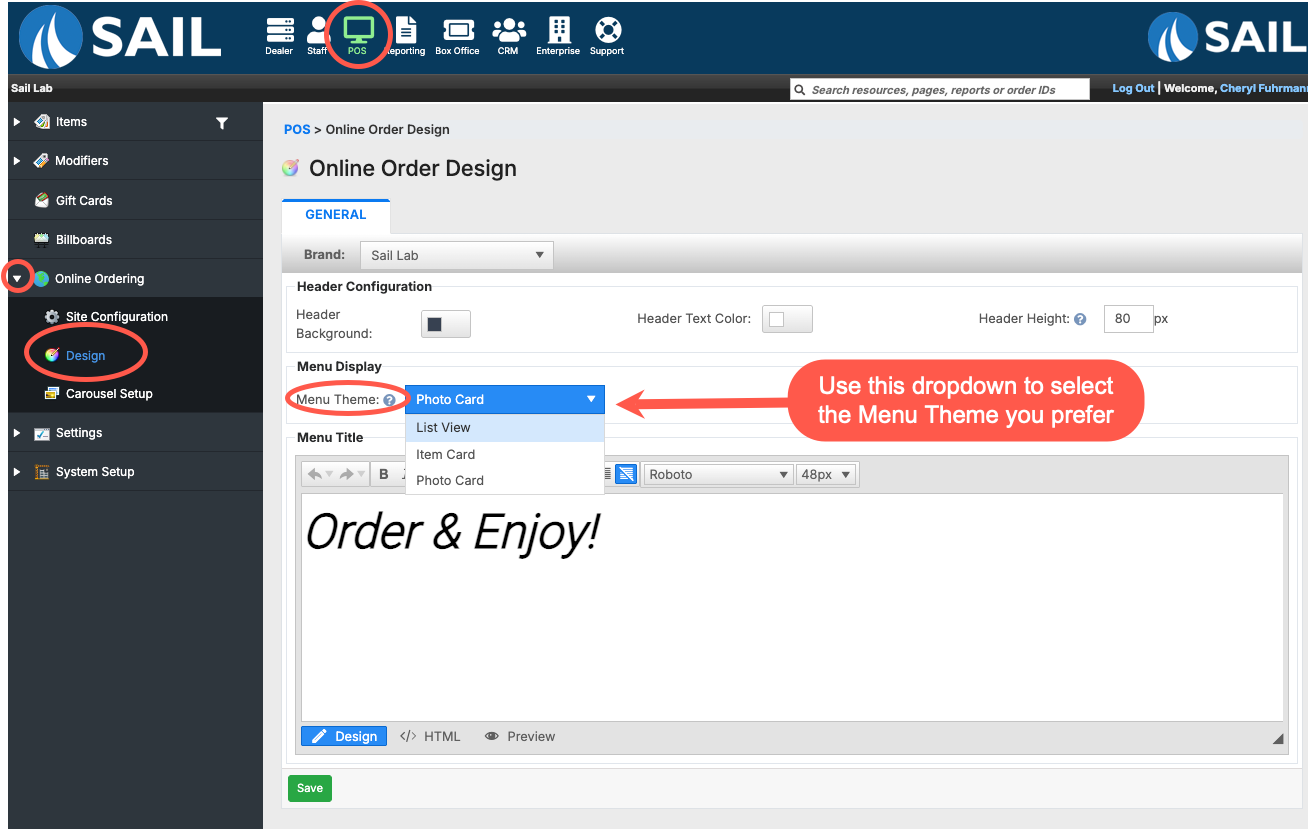
- List View (previous default)
- Two columns
- Description area grows to fit the full description
- Smaller photo
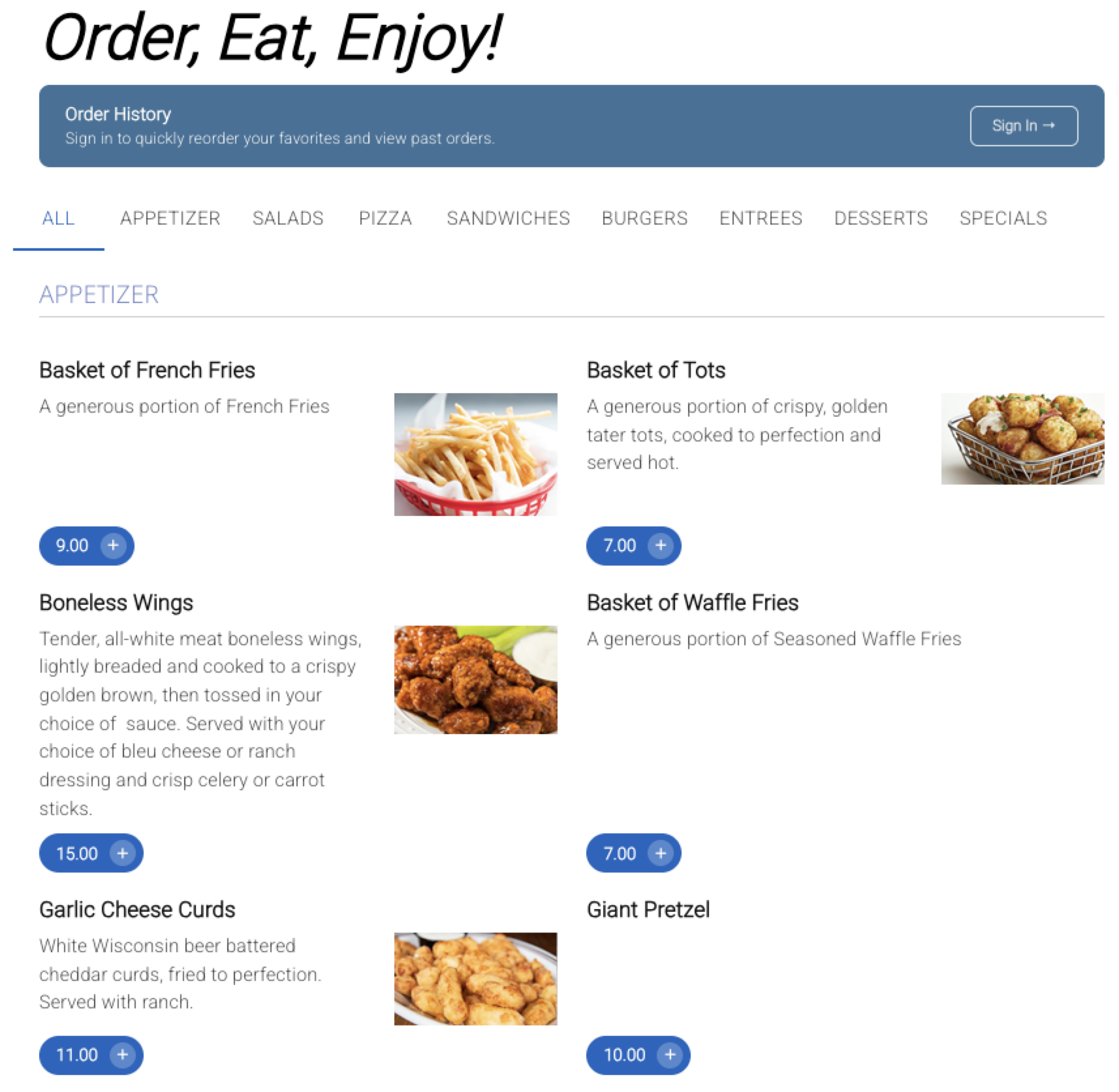
- Item Card (new default)
- Two columns
- Descriptions display up to two lines before showing an ellipsis (...) so guests know there is more to read when they click in
- All item cards are the same size, creating a clean, uniform appearance
- Larger photo on the right side of each item
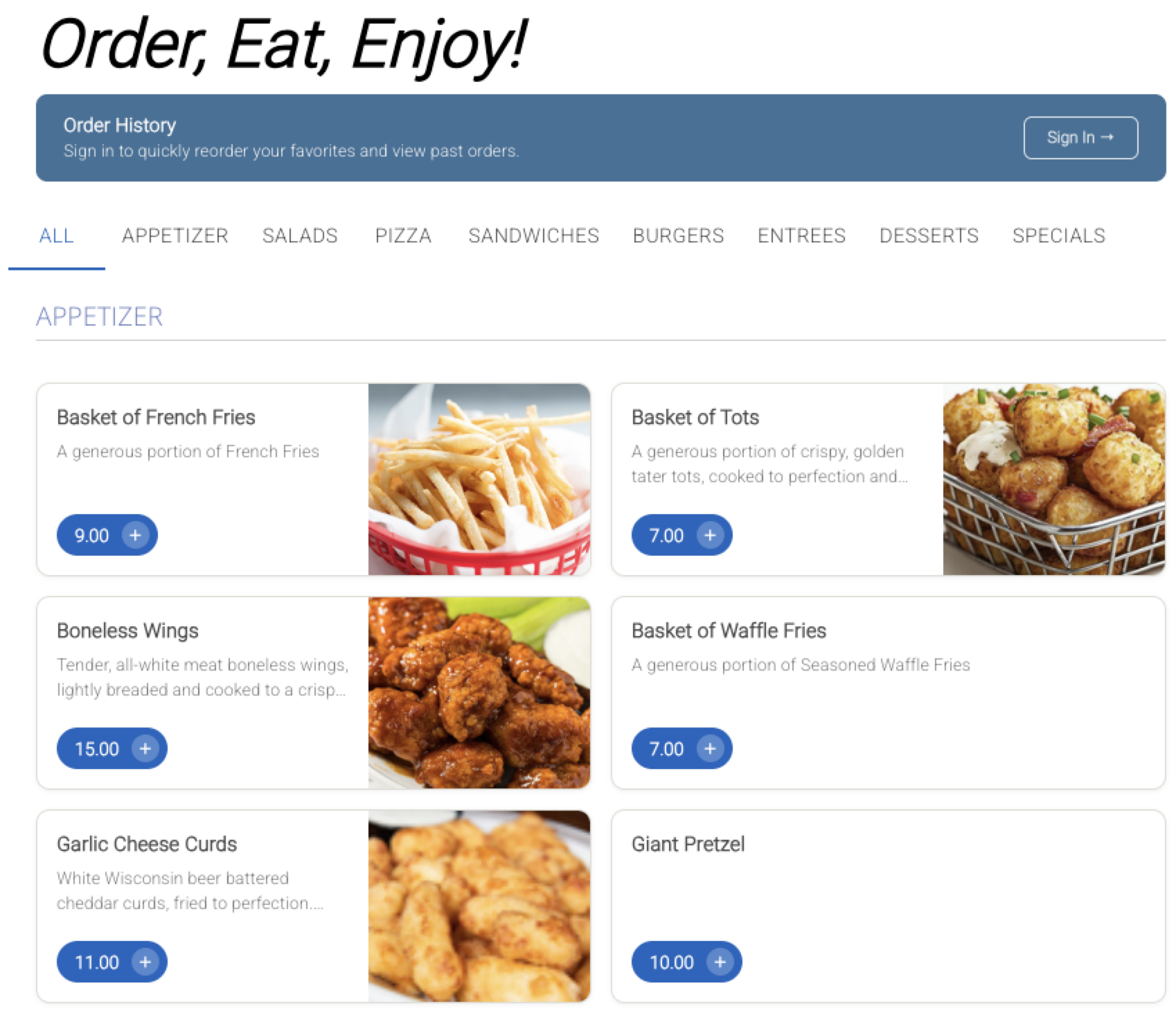
- Photo Card (new)
- Three columns
- Descriptions display up to three lines before showing an ellipsis (...)
- Cards in the same row stay the same height for a consistent layout
- Photo is the main focal point at the top of the card
2. Modifier Type Print Sequencing
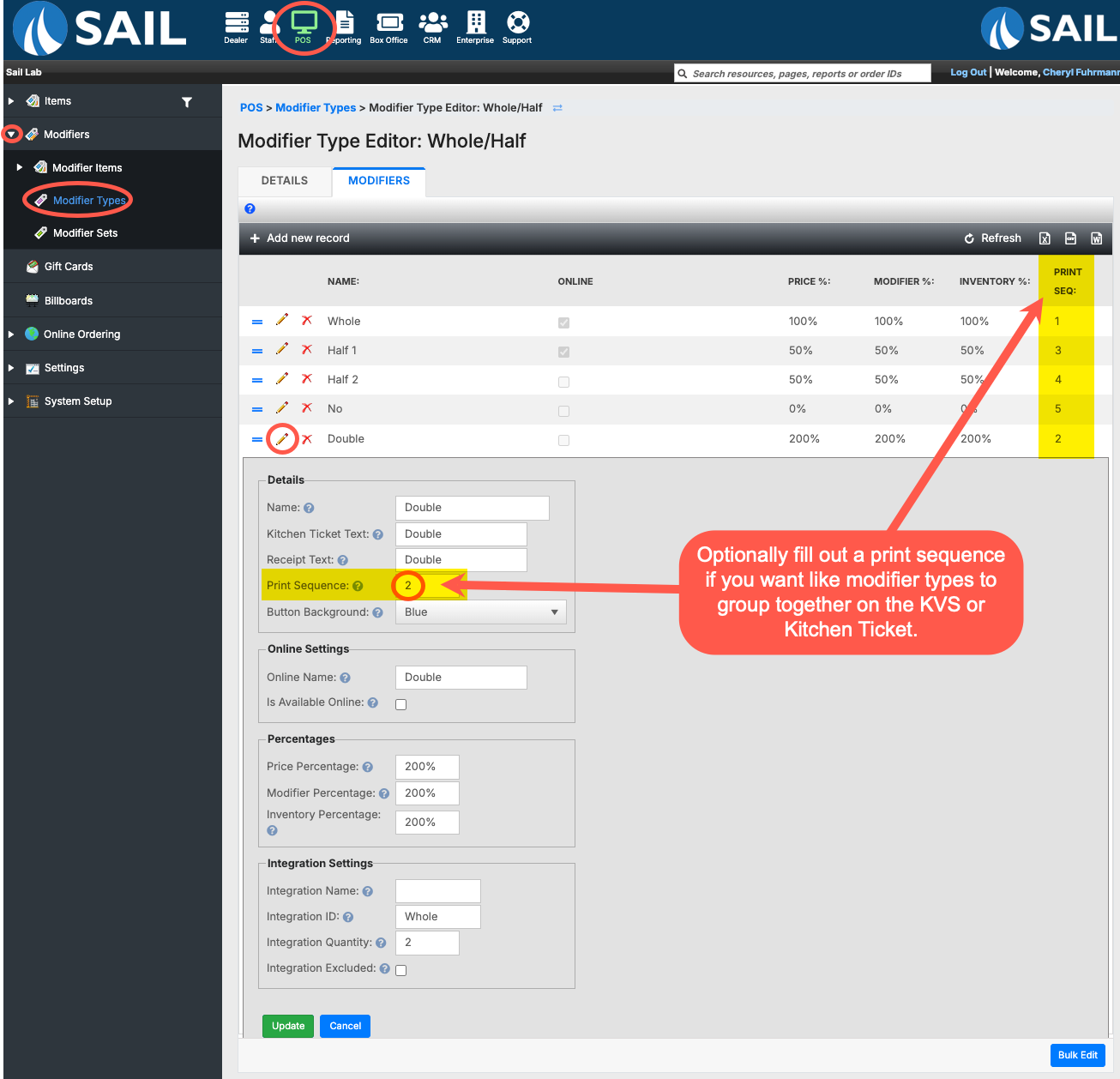
- You can now optionally assign a Print Sequence number to modifier types. When set, the kitchen ticket and KVS will group like modifier types together regardless of the order they were rung in on the terminal — making tickets easier and faster to read in the kitchen.
- To set a print sequence, go to Backoffice --> POS --> Modifiers --> Modifier Types --> click the pencil to edit a modifier type --> click the pencil next to the modifier name --> enter a number in the Print Sequence field.
- Modifier types with lower numbers will appear first. Modifier types without a sequence number will appear at the end.
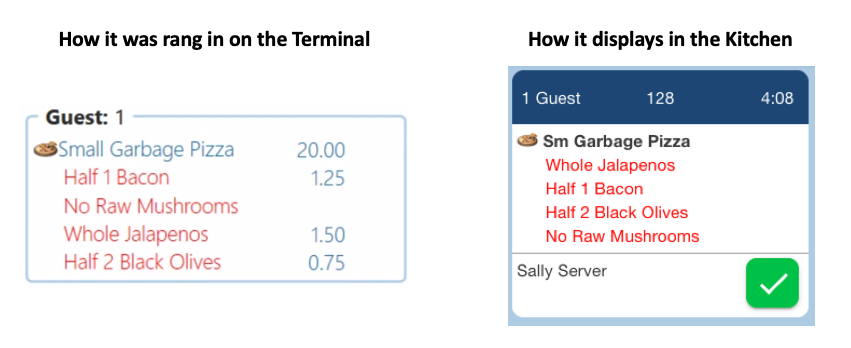
- Example: A pizza is rung in on the terminal as: Half 1 Bacon, No Raw Mushrooms, Whole Jalapeños, Half 2 Black Olives. With sequencing configured, the kitchen ticket will display them grouped by type: Whole Jalapeños, Half 1 Bacon, Half 2 Black Olives, No Raw Mushrooms.
3. 28 Additional New Actions
- This release continues the rollout of new actions that began in the previous release. An additional 28 actions are being added this sprint, with more still to come.
- As a reminder, an Action is a single step that performs a specific function, and a Shortcut is a button made up of one or more actions. Actions without a checkmark in the "Can it be used in a Shortcut" column can still be placed directly on a screen as a standalone button — they just can't be combined into a shortcut with other actions.
- Below is a table with the new actions included in this release, covering the action name, what it does, whether it can be used in a Shortcut, and which devices it supports.
| Action Name | Group | What it does | Available in Shortcuts | Available on Terminals | Available on Handheld |
| Set Course | Kitchen & Firing | Sets the kitchen course on the selected items — pick a course, clear it, or prompt at runtime. | ✓ | ✓ | ✓ |
| Set As App | Kitchen & Firing | Sets, clears, or toggles the 'As App' (appetizer) flag. Setting it clears 'Later'. | ✓ | ✓ | ✓ |
| Set Later | Kitchen & Firing | Sets, clears, or toggles the 'Later' flag. Setting it clears 'As App'. | ✓ | ✓ | ✓ |
| Set No Make | Kitchen & Firing | Sets, clears, or toggles the 'No Make' flag on the selected items. | ✓ | ✓ | ✓ |
| Set Shared | Kitchen & Firing | Sets, clears, or toggles the 'Shared' flag on the selected items. | ✓ | ✓ | ✓ |
| Hold / Fire | Kitchen & Firing | Holds, Fires, Refires, or toggles hold/fire on the selected items. Hold can use a set time or prompt for one. | ✓ | ✓ | ✓ |
| Fire Course | Kitchen & Firing | Saves the order and fires a course to the kitchen — a set course or prompt. | ✓ | ✓ | ✓ |
| Re-Fire Order | Kitchen & Firing | Re-fires every already-printed item on the order to the kitchen. Needs the Re-Fire Items permission. | ✓ | ✓ | ✓ |
| Send to Kitchen | Kitchen & Firing | Sends the order to the kitchen. Optionally stay on the order afterward. | ✓ | ✓ | ✓ |
| Lookup Customer | Terminal & Session | Searches for a customer and attaches them to the order, or creates one. Needs an open order. | ✓ | ✓ | |
| Open Last Order | Terminal & Session | Opens the last order worked at this terminal. Prompts to save first. | ✓ | ||
| Open Calculator | Terminal & Session | Opens the on-screen calculator. | ✓ | ||
| Check Gift Card Balance | Terminal & Session | Prompts for a gift card and shows its balance. | ✓ | ||
| Refresh Cache | Terminal & Session | Re-syncs this terminal's data from the server. Logs out when done — use it as the last step. | ✓ | ||
| Toggle Price Levels | Terminal & Session | Prompts to turn a quick-toggle price level on or off for this terminal. | ✓ | ||
| Time Clock | Terminal & Session | Clocks the current user in or out. Clocking out logs them out. | ✓ | ||
| Daily Report | Reports | Previews and prints the location's Daily Report. | ✓ | ||
| Server Report | Reports | Previews and prints a Server Report. The all-users permission lets you pick any server. | ✓ | ||
| Assign Drawer | Cash & Money | Assigns a cash drawer. With the right permission, to another user. | ✓ | ||
| Pay In | Cash & Money | Records a cash pay-in (amount + note), opens the drawer, and prints a slip. | ✓ | ||
| Pay Out | Cash & Money | Records a cash pay-out (amount + note), opens the drawer, and prints a slip. | ✓ | ||
| Cash Paid | Cash & Money | Records a server-to-server cash payment (settlement). Servers only. | ✓ | ||
| Cash Received | Cash & Money | Records a server-to-server cash receipt (settlement). Servers only. | ✓ | ||
| Submit Tipout | Cash & Money | Submits a tip-out to another server. Tippable employees only. | ✓ | ||
| Transfer Guests | Transfer | Moves the selected guest(s) and their items to another order. | ✓ | ||
| Transfer Items | Transfer | Moves the selected items to another order. | ✓ | ||
| Transfer & Combine | Transfer | Combines one or more other orders into this one. | ✓ | ||
| Transfer Open Orders | Transfer | Moves all of your open orders to another server. | ✓ |
Fixes
- Fixed an issue where occasionally one item on a KVS ticket would not appear, even though it was sent to the kitchen with the rest of the order.
- Fixed an issue in the POS tab item filter where selecting "Inactive" items would expand the entire item list instead of only the category currently open.
- Fixed an issue where cook time percentage location overrides were not being applied. The system was only using the default setting instead of the location-specific one.
- Fixed an issue where pressing and holding on the Table View or Order View screen would sometimes ring in an item in the background unintentionally.
- Increased the Offline Credit Card reconciliation timeout from 2 minutes to 30 minutes.
- Fixed an issue where item filters were not functioning correctly when used with Rewards.