
How to edit Minimum Wage
This document will show you how to edit all employeesemployees' minimum wage at one timetime.
How to edit minimum wage
- Log into Backoffice --> Staff --> Settings: click Staff at the top, then Settings in the menu on the left.
- Scroll down to the Payroll Settings box. In the box next to
minimumMinimumwage,Wage, update the amount to the current minimumwagewage. - Click
saveSave Settings at the bottom right of the page. It turns blue once you've changed something.
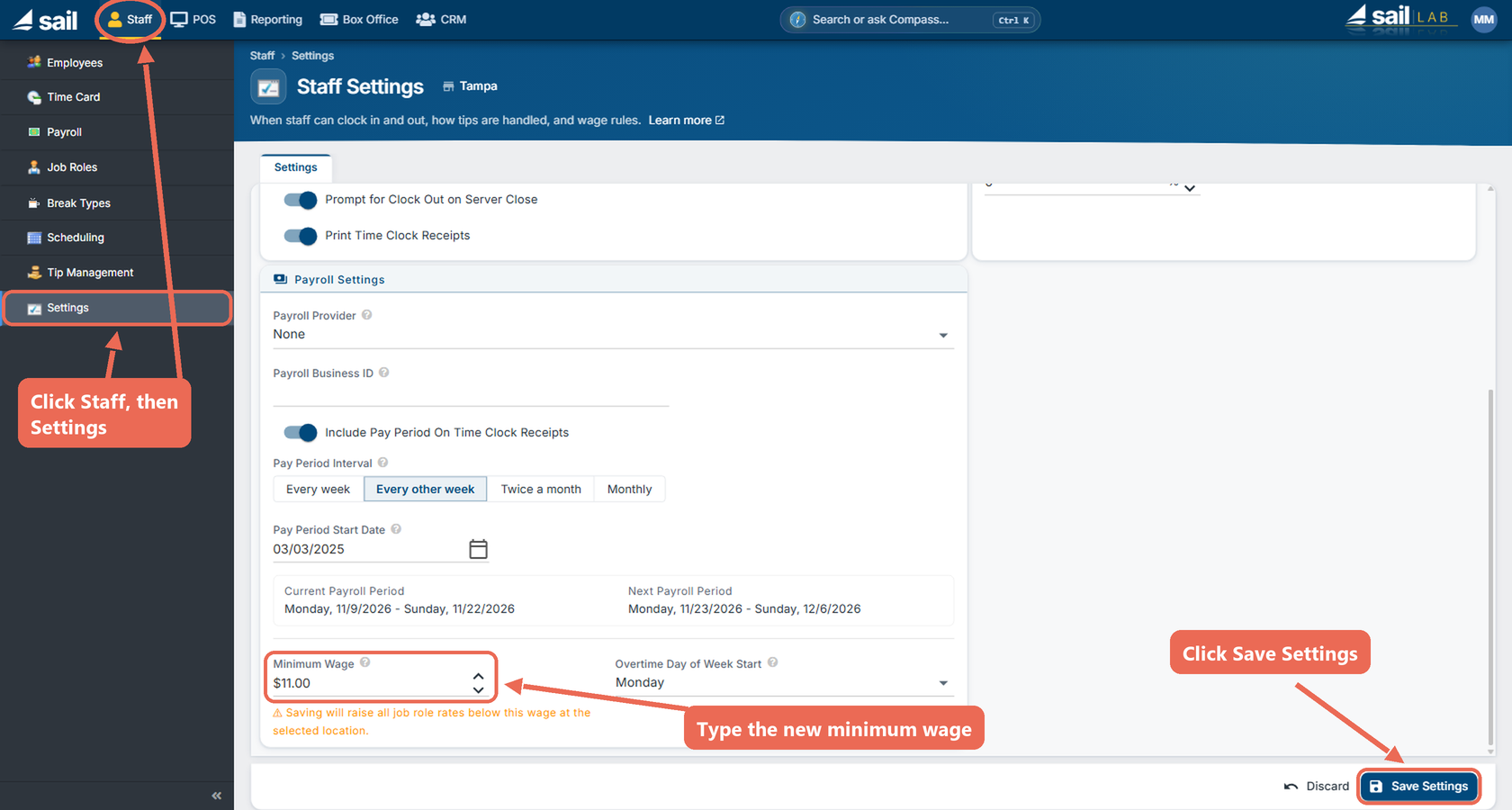
ANY employee whowhose wasjob role rate is at or below this dollar amount will automatically change to the new dollar amount for the selected storestore. Once you change the amount, a reminder shows under the box:


After you save, a message at the bottom of the page tells you how many job role rates were raised.
Note: A job role rate of $0.00 is left as it is. New job roles start at the minimum wage you set here.
Note: The minimum wage is for one location. If you have more than one location, pick the location at the top of the page, next to Staff Settings, and set the minimum wage for each location.
Click here to learn how to change one employee's hourly pay rate.