
Understanding the Job Role tasks tree
This document will walk you through the Tasks list on a job role in Backoffice: how the tasks are grouped, what the check boxes mean, where to see what each task does, and which tasks to give each job role. At the end is a list of the tasks and what they do.
Tasks are what a job role is allowed to do - on the terminal, on the handheld and in Backoffice. Everyone with the job role gets its tasks.
Permissions you need
To change the tasks on a job role, your job role needs the Manage Job Roles task (Staff).
Get to the Tasks list
-
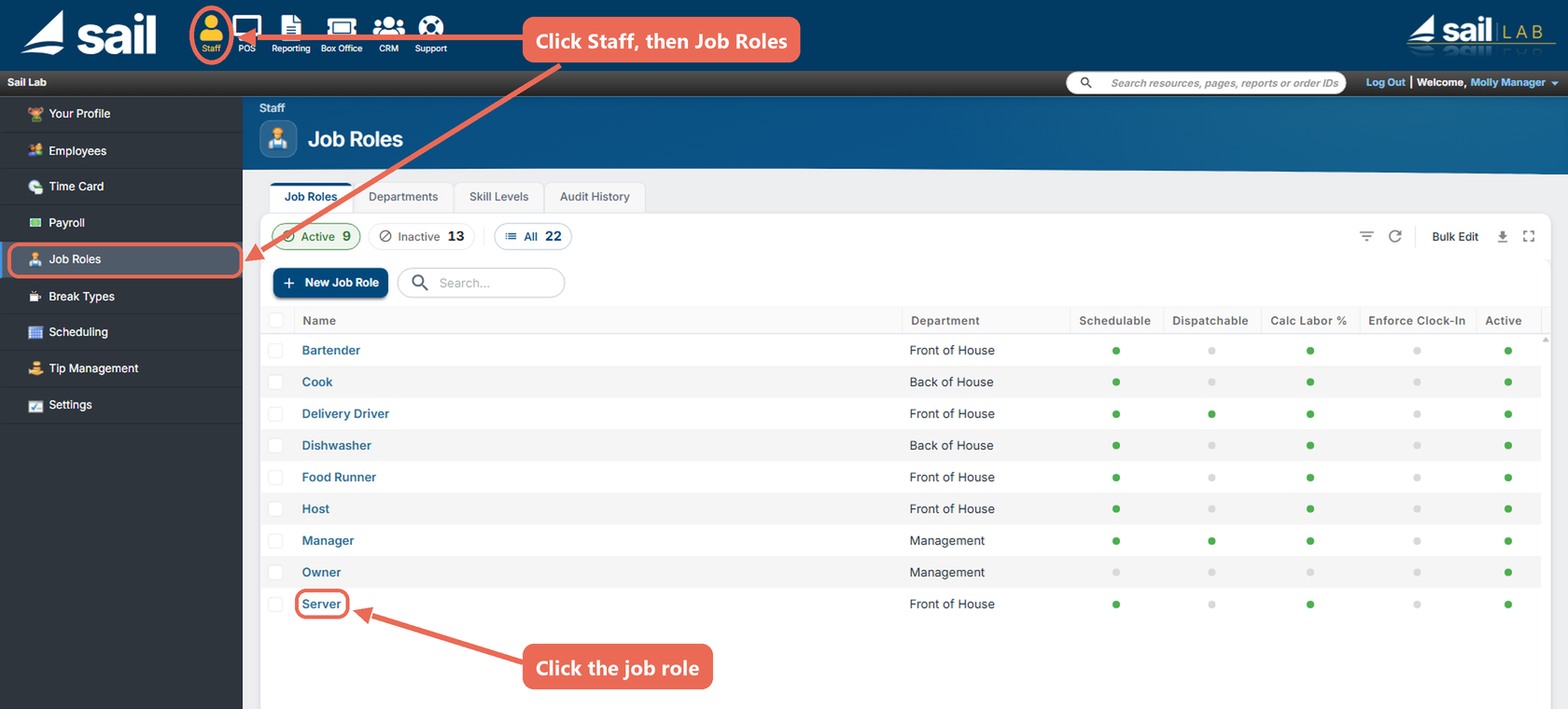
Navigate to Backoffice --> Staff --> Job Roles: click Staff at the top, then Job Roles in the menu on the left, and click the job role you want to change.
-
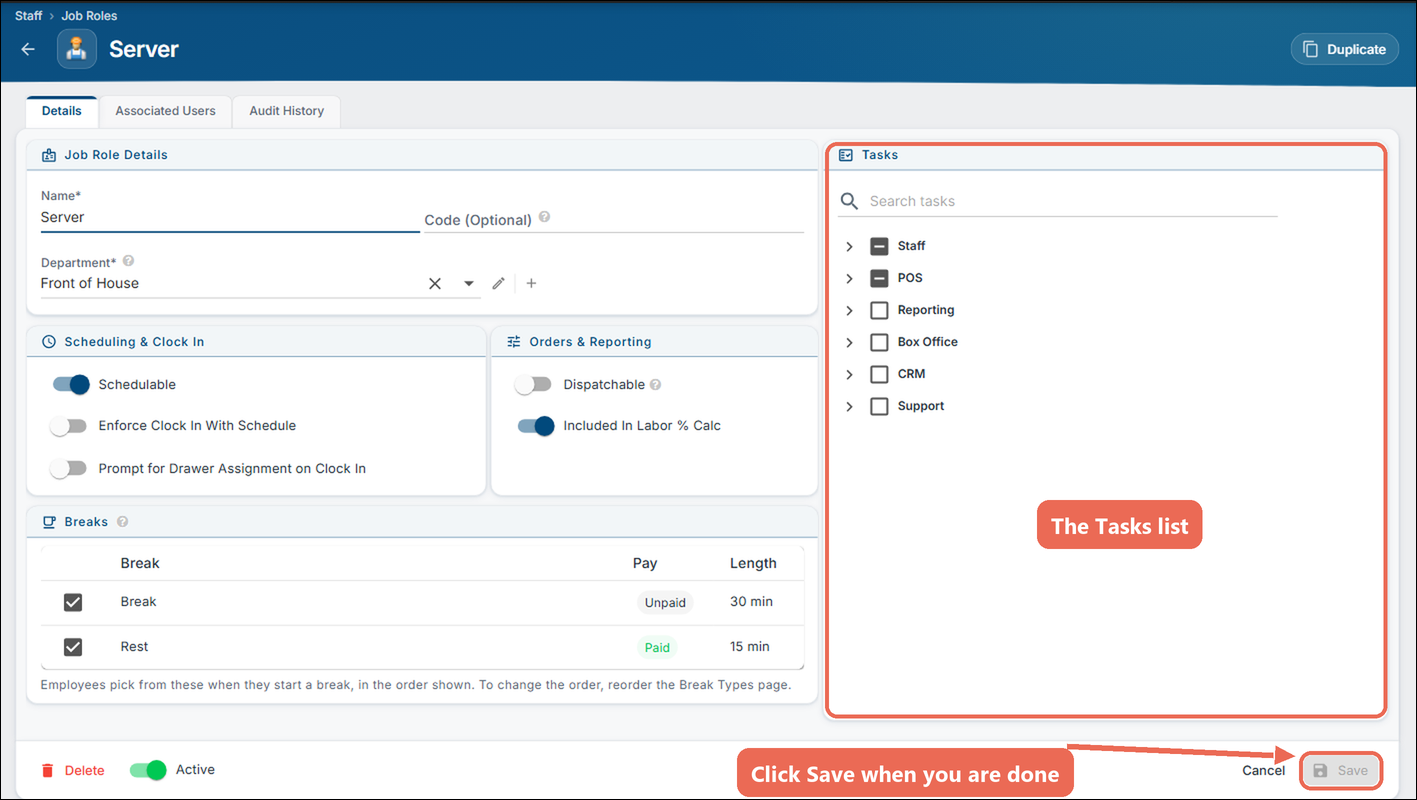
The Tasks list is on the right of the job role. Check the tasks the job role should have and uncheck the ones it shouldn't.
-
Click Save at the bottom right. Nothing is kept until you click it.
How the tasks are grouped
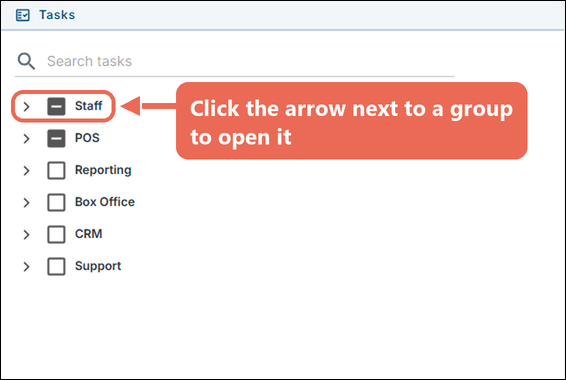
The tasks are in groups, in the same order as the menu at the top of Backoffice. Click the arrow next to a group to open it; some groups have smaller groups inside.
- Staff: the person's own profile, employees, payroll, scheduling, time cards, job roles and staff settings.
- POS: Front of House is what staff do on the terminal and handheld (orders, payments, voids, cash drawers, closing out). Back Office is setting up the POS in Backoffice (items, modifiers, gift cards, online ordering, settings, system setup and devices).
- Reporting: each report and export, sales history, deposits and custom reports.
- CRM: reservations, customers and receipt coupons.
- Enterprise: the company, brands, districts and locations.
- Support: the help center and licensing.
What the check boxes mean
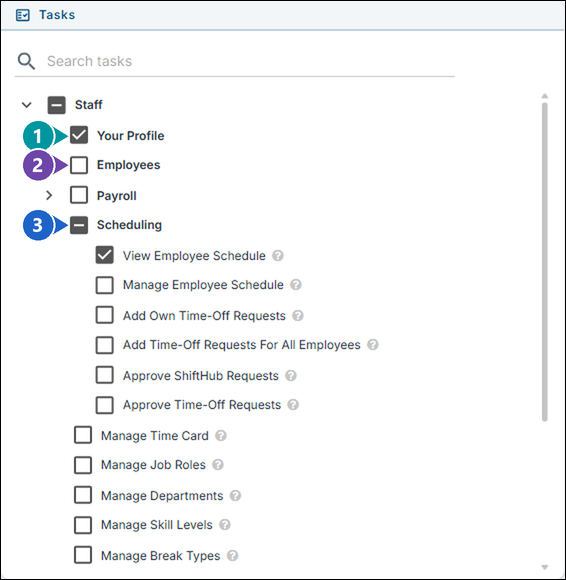
Every task and every group has a check box. A group's check box shows how many of the tasks inside it are checked.
-
Check mark: on a task, the job role has it. On a group, the job role has every task in the group.
-
Empty: on a task, the job role doesn't have it. On a group, the job role has none of the tasks in the group.
-
Box with a line (groups only): the job role has some of the tasks in the group. Open the group to see which.
Clicking a group's check box changes every task in it: an empty group or a group with a line checks all its tasks, and a checked group unchecks all of them.
Clicking a group with a line checks every task in it, not just the ones already checked. When the job role should only have some of them, open the group and check the tasks one at a time.
Where task descriptions appear
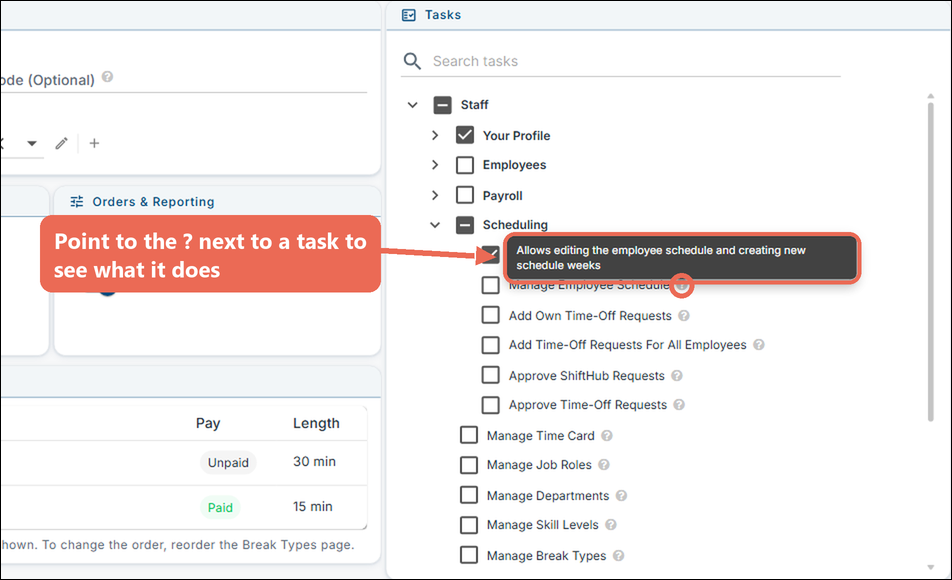
Point to the ? next to a task to see what it does. The same descriptions are in the list at the end of this page.
To find a task, type a word in Search tasks at the top of the list. It finds the word in task names and in their descriptions, and opens the groups they are in.
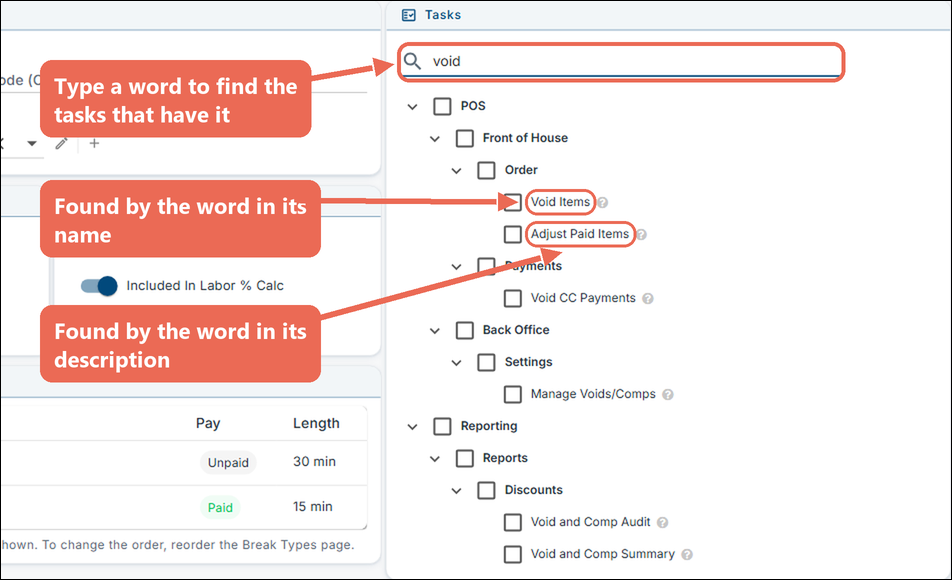
Note: While you are searching, a group's check box only changes the tasks the search shows.
Pro tip: Some descriptions end with "(Note: … is also needed)". Give the job role that task too, or the first one won't work.
Tasks you won't see
The Tasks list only shows the tasks your own job role has, so you can't give anyone more than you can do. If a task you need to give isn't there, ask someone whose job role has it (usually the owner).
Recommended tasks for each job role
Give each job role only the tasks the people in it need. These are good starting points; change them to fit how your business works.
- Host: Staff --> Your Profile (all three) and View Employee Schedule.
- Server: everything a host has, plus, under POS --> Front of House:
- Order: Create and View Orders, Table Transfer, 2 Step Server Transfer, Transfer Items Between Tables, Schedule Future Orders, Open Cash Drawer, Manage 86 List and Set Tax Exemption.
- Payments: Enter Tips and Reprint CC Receipt.
- Functions: Server Report - Own, Server Close - Own, Submit Tipout, Cash Paid, Cash Received, Clean Screen, Calculator and Check Gift Card Balance.
- Bartender: everything a server has, plus View All Orders (so bartenders can work each other's tabs), Credit Card Re-Apply and Assign Drawer to Self. Add Process Pay-Out and Process Pay-In if bartenders run their own drawer.
- Manager: everything a bartender has, plus:
- Voids, comps and refunds: Void Items, Comp Items, Adjust Paid Items, Process Refunds and Void CC Payments.
- Manager only items: Enter Manager Only Discounts, Enter Manager Only Menu Items, Enter Manager Only Charges and Use Manager Only Tenders.
- Other people's work: View All Payments, Single Step Server Transfer, Open Cash Drawer Assigned to Someone Else, Assign Drawer to Anyone, Server Report - All Users and Server Close - All Users.
- Closing: Daily Report, Daily Close, Reverse Server Close and Rollover Tables.
- Staff: the Employees, Scheduling and Manage Time Card tasks.
- Reporting: the reports they need to run the shift.
- Owner: every task. Keep the Enterprise tasks, Process Payroll, Manage Sail Payroll and Manage Items - All for the owner and the people they trust with them (a manager can have Manage Items - Management Only instead).
Pro tip: Many tasks come in pairs - one for the person's own work and one for everyone's (Server Report - Own and Server Report - All Users, Assign Drawer to Self and Assign Drawer to Anyone). Give staff the "own" task and managers both.
Pro tip: To start a new job role from one that's close, open that job role and click Duplicate at the top right, then change the tasks.
Full list of tasks
The tasks in the Tasks list, in the same order, with what each one does. "Where in the list" is the group it's in.
Staff
| Where in the list | Task | What it does |
|---|---|---|
| Staff > Your Profile | Edit Own User Details | Allows users to edit their name, contact information, and back office log in |
| Staff > Your Profile | Edit Own Access Code | Allows users to edit their own system access code |
| Staff > Your Profile | Edit Own Availability | Allows users to edit their availability for scheduling purposes |
| Staff > Employees | Edit Employee Details | Allows editing all information on the employee details tab for all employees |
| Staff > Employees | Edit Payroll Details | Allows viewing and editing the payroll details of all employees - date of birth, gender, worker classification and payment method |
| Staff > Employees | Assign Job Roles | Allows assigning job roles to other users |
| Staff > Employees | Allow Clock In Anytime | Overrides the Enforce Clock In setting and allows the user to clock in anytime |
| Staff > Employees | Allow Manual Time Clock Entries Without Audit Notes | Allows manually entering or editing a time clock entry without requiring an audit note |
| Staff > Employees | Import Employees | Allows importing staff |
| Staff > Employees | Export Employees | Allows exporting staff |
| Staff > Payroll | Process Payroll | Allows processing a pay period - building the payroll run, locking its punches and producing the export file or submission |
| Staff > Payroll | Reopen Pay Period | Allows reopening a processed pay period, which releases its punches for editing |
| Staff > Payroll | Manage Sail Payroll | Allows managing the Sail Payroll connection - company setup, the owner and bank details, pay schedules and employee onboarding |
| Staff > Payroll | Open Sail Payroll Portal | Allows opening the Sail Payroll portal as themself - the link is always for the signed-in user's own email |
| Staff > Scheduling | View Employee Schedule | Allows viewing the employee schedule |
| Staff > Scheduling | Manage Employee Schedule | Allows editing the employee schedule and creating new schedule weeks |
| Staff > Scheduling | Scheduling Administrator | Provides full control to manage scheduling system |
| Staff > Scheduling | Approve ShiftHub Requests | Allows approving or denying employees’ shift swap requests from ShiftHub |
| Staff > Scheduling | Approve Time-Off Requests | Allows approving or denying time off requests for all employees (Note: 'Add Own Time-Off Requests' is also required to be able to approve) |
| Staff | Manage Time Card | Allows editing the time clock for all employees |
| Staff | Manage Job Roles | Allows adding or editing job roles |
| Staff | Manage Departments | Allows adding or editing job role departments |
| Staff | Manage Skill Levels | Allows adding or editing job role skill levels |
| Staff | Manage Break Types | Allows adding or editing break types and their per-location overrides |
| Staff | Manage Tip Management | Allows editing tipouts and reported cash tips |
| Staff | Manage Staff Settings | Allows editing various staff related settings |
POS
| Where in the list | Task | What it does |
|---|---|---|
| POS > Front of House > Order | Create and View Orders | Allows entering an order as well as viewing your own orders and associated payments |
| POS > Front of House > Order | View All Orders | Allows accessing teammates orders |
| POS > Front of House > Order | Check-in Will Call | Allows checking-in purchased box office tickets stored in Will Call |
| POS > Front of House > Order | Table Transfer | Allows changing a table number on an already existing table |
| POS > Front of House > Order | Single Step Server Transfer | Allows transferring a table to another person without their acceptance |
| POS > Front of House > Order | 2 Step Server Transfer | Allows transferring a table to another person, however they will need to approve the transfer before it is complete |
| POS > Front of House > Order | Transfer Items Between Tables | Allows transferring individual items or entire guests to a new or existing table |
| POS > Front of House > Order | Schedule Future Orders | Allows scheduling orders for a future date and time |
| POS > Front of House > Order | Open Cash Drawer | Allows opening an unassigned cash drawer or a drawer assigned to yourself |
| POS > Front of House > Order | Open Cash Drawer Assigned to Someone Else | Allows opening a cash drawer assigned to anyone |
| POS > Front of House > Order | Manage 86 List | Allows adding, removing and updating items on the 86 list |
| POS > Front of House > Order | Re-Fire Items | Allows re-firing items to the kitchen |
| POS > Front of House > Order | Price Adjust | Allows changing the price of a rang-in item using the price adjust function |
| POS > Front of House > Order | Void Items | Allows voiding an item |
| POS > Front of House > Order | Comp Items | Allows comping an item |
| POS > Front of House > Order | Adjust Paid Items | Allows voiding or comping an item that has been paid |
| POS > Front of House > Order | Enter Manager Only Discounts | Allows issuing a discount that requires a manager |
| POS > Front of House > Order | Enter Manager Only Menu Items | Allows entering items that require a manager |
| POS > Front of House > Order | Enter Manager Only Charges | Allows entering charges that require a manager |
| POS > Front of House > Order | Use Manager Only Tenders | Allows using tenders that require a manager |
| POS > Front of House > Order | Process Refunds | Allows processing a negative payment resulting in a refund to the customer |
| POS > Front of House > Order | Set Tax Exemption | Allows adding a tax exemption to an order |
| POS > Front of House > Order | Manually Adjust Member Reward Points | Allows manually adding or removing rewards points from members of the rewards system |
| POS > Front of House > Payments | View All Payments | Allows viewing and editing teammates payments |
| POS > Front of House > Payments | Enter Tips | Allows entering tips on all non-cash payments such as credit cards, gift cards and customer accounts |
| POS > Front of House > Payments | Credit Card Re-Apply | Allows re-applying a previous credit card payment |
| POS > Front of House > Payments | Reprint CC Receipt | Allows reprinting a credit card receipt |
| POS > Front of House > Payments | Void CC Payments | Allows voiding a credit card payment |
| POS > Front of House > Dispatch | View Dispatch Screen | Grants access to the dispatch screen |
| POS > Front of House > Dispatch | Dispatch Orders to Yourself | Grants the ability to dispatch orders to yourself (user must be clocked in as a dispatchable job role) |
| POS > Front of House > Dispatch | Dispatch Orders to Any Driver | Grants the ability to dispatch orders to any dispatchable user |
| POS > Front of House > Functions > Management | Register User Card | Allows registering a card to a user |
| POS > Front of House > Functions > Management | Refresh Cache | Allows refreshing the cache which will resync the system with changes made in back office |
| POS > Front of House > Functions > Management | Device Settings | Allows editing device settings such as the configured printer or cash drawer |
| POS > Front of House > Functions > Management | Enable Offline Credit Card Mode | Allows enabling and disabling offline credit card support |
| POS > Front of House > Functions > Management | Enable Training Mode | Allows turning training mode on and off |
| POS > Front of House > Functions > Management | Manage Table Layout | Allows editing the table layout on the terminal, including adding, renaming, reordering and deleting sections |
| POS > Front of House > Functions > Management | Toggle Price Levels | Allows turning Quick Toggle price levels on and off |
| POS > Front of House > Functions > Cash Tools | Assign Drawer to Anyone | Allows assigning a cash drawer to any employee |
| POS > Front of House > Functions > Cash Tools | Assign Drawer to Self | Allows assigning a cash drawer to yourself |
| POS > Front of House > Functions > Cash Tools | Process Pay-Out | Allows processing a pay-out from the cash drawer |
| POS > Front of House > Functions > Cash Tools | Process Pay-In | Allows processing a pay-in to the cash drawer |
| POS > Front of House > Functions > Cash Tools | Deposits: Add New or Edit Same Day | Allows recording a bank deposit at the terminal and editing deposits made during the open business day |
| POS > Front of House > Functions > Reports | Server Report - Own | Allows running a server report for yourself |
| POS > Front of House > Functions > Reports | Server Report - All Users | Allows running a server report for all users |
| POS > Front of House > Functions > Reports | Daily Report | Allows running a report to see the current day's sales |
| POS > Front of House > Functions > Money Management | Submit Tipout | Allows a user to submit a tipout to another user for payroll reporting purposes only |
| POS > Front of House > Functions > Money Management | Cash Paid | Allows recording a cash payment paid out to another user |
| POS > Front of House > Functions > Money Management | Cash Received | Allows recording a cash payment received from another user |
| POS > Front of House > Functions > Close Operations | Server Close - Own | Allows closing out sales for the day for yourself |
| POS > Front of House > Functions > Close Operations | Server Close - All Users | Allows closing out sales for the day for all users |
| POS > Front of House > Functions > Close Operations | Daily Close | Allows completely closing the day's sales. This will also settle the credit card batch |
| POS > Front of House > Functions > Close Operations | Reverse Server Close | Allows reversing a close out on a specific server |
| POS > Front of House > Functions > Close Operations | Rollover Tables | Allows open orders to stay open and roll over to the next close |
| POS > Front of House > Functions > General | Clean Screen | Displays a 30 second countdown to allow cleaning the screen without pressing any buttons |
| POS > Front of House > Functions > General | Calculator | Allows using a calculator |
| POS > Front of House > Functions > General | Check Gift Card Balance | Allows checking the balance on a gift card |
| POS > Back Office > Items | Manage Items - All | Allows adding and editing all menu items in the system |
| POS > Back Office > Items | Manage Items - Management Only | Allows editing only menu items that have been marked as 'Allow Management To Edit' |
| POS > Back Office > Modifiers | Manage Modifier Items | Allows adding and editing all modifier items in the system |
| POS > Back Office > Modifiers | Manage Modifier Types | Allows adding and editing modifier types |
| POS > Back Office > Modifiers | Manage Modifier Sets | Allows adding and editing modifier sets |
| POS > Back Office > Gift Cards | Manage Gift Cards | Allows adding, editing and searching for gift cards in the system |
| POS > Back Office > Gift Cards | Manage Gift Card Types | Allows creating new gift card types |
| POS > Back Office > Gift Cards | Activate Gift Cards | Allows activating a range of gift cards |
| POS > Back Office > Online Ordering | Manage Configuration | Allows managing all aspects of online ordering |
| POS > Back Office > Online Ordering | Manage Site Groups | Allows managing online ordering site groups and their Location Finder |
| POS > Back Office > Online Ordering | Design | Allows configuring online ordering design elements for the brand |
| POS > Back Office > Online Ordering | Page Messages | Allows configuring messages displayed on various pages within online ordering |
| POS > Back Office > Online Ordering | Hours | Allows configuring hours and menu availability for online ordering |
| POS > Back Office > Online Ordering | Throttling | Allows configuring throttling rules within online ordering |
| POS > Back Office > Online Ordering | Category Setup | Allows configuring item categories available for online ordering |
| POS > Back Office > Online Ordering | Manage Upsells | Allows configuring upsells for online ordering |
| POS > Back Office > Online Ordering | Carousel Setup | Allows building carousel digital signs for online ordering |
| POS > Back Office > Settings | Manage Terminal Setup | Allows configuring terminal settings such as the screen saver, table numbering and launch screens |
| POS > Back Office > Settings | Manage Terminal Screens | Allows managing the screens on the terminals including adding new tabs and buttons, changing colors and moving locations |
| POS > Back Office > Settings | Manage Price Levels | Allows managing price levels, adjusting item prices and adding or editing happy hours |
| POS > Back Office > Settings | Manage Item Filters | Allows managing item filters |
| POS > Back Office > Settings | Manage Context Filters | Allows managing context filters |
| POS > Back Office > Settings | Manage Voids/Comps | Allows adding and editing void and comp reasons |
| POS > Back Office > Settings | Manage Discounts | Allows adding and editing discounts |
| POS > Back Office > Settings | Manage Size Groups | Allows configuring size groups and their associated sizes |
| POS > Back Office > Settings | Manage Custom Icons | Allows adding custom icons to the system |
| POS > Back Office > Settings | Manage Charges | Allows adding and editing charges such as service fees and automatic gratuities |
| POS > Back Office > Settings | Manage Closing Configuration | Allows configuring your closing settings and enabling an auto close |
| POS > Back Office > System Setup > Kitchen Setup | Ticket Routing Rules | Allows managing kitchen ticket routing rules |
| POS > Back Office > System Setup > Kitchen Setup | Kitchen Video | Allows managing kitchen video configuration |
| POS > Back Office > System Setup > Kitchen Setup | Label Print Rules | Allows managing label print rules |
| POS > Back Office > System Setup > Devices | Prep Printers | Allows managing prep printers and prep printer collections |
| POS > Back Office > System Setup > Devices | Receipt Printers | Allows managing receipt printers |
| POS > Back Office > System Setup > Devices | Label Printers | Allows managing label printers |
| POS > Back Office > System Setup > Devices | Cash Drawers | Allows managing system cash drawers |
| POS > Back Office > System Setup > Devices | Client Devices | Allows managing client devices such as terminals or handhelds |
| POS > Back Office > System Setup > Devices | Payment Terminals | Allows managing payment terminals and merchant processor configuration |
| POS > Back Office > System Setup > Devices | Handheld Profiles | Allows managing handheld profiles - the tip prompt and other settings applied to TableSide devices |
| POS > Back Office > System Setup | Manage Order Types | Allows adding and editing different order types such as dine-in, to-go, Doordash, etc |
| POS > Back Office > System Setup | Manage Delivery Zones | Allows configuring various delivery zones |
| POS > Back Office > System Setup | Manage Tenders | Allows adding and editing tender types such as cash, credit, 3rd party payments, etc |
| POS > Back Office > System Setup | Manage Taxes | Allows adding and editing tax rates |
| POS > Back Office > System Setup | Manage Profit Centers | Allows adding and editing profit centers. Profit centers are used to segment sales and can be used to route printers or adjust pricing |
| POS > Back Office > System Setup | Manage Zones | Allows adding and editing zones. Zones are used to segment devices and can be used to route printers or adjust pricing |
| POS > Back Office > System Setup | Manage Reporting Groups | Allows adding and editing reporting group names |
| POS > Back Office > System Setup | Manage Auto Print Rules | Allows adding and editing rules that automatically print receipts and credit card vouchers based on transaction triggers, schedule, and filters |
| POS > Back Office > System Setup | Manage Receipt Setup | Allows editing what is seen on customer receipts |
| POS > Back Office > System Setup | Manage Day Parts | Allows adding and editing the parts that you want the day broken into for reporting purposes |
| POS > Back Office > System Setup | Manage Integrations | Allows configuring integrations |
| POS > Back Office | Manage Billboards | Allows managing billboards that are displayed to users |
Reporting
| Where in the list | Task | What it does |
|---|---|---|
| Reporting > Reports > Accounting | Customer Account Transactions | Shows all customer account transactions for a specified date range |
| Reporting > Reports > Accounting | Batch Report By Date | Shows all batches for a specific store on a specific date |
| Reporting > Reports > Accounting | Customer Account Activity | Shows all customer account activity that affects the balance during the specified date range |
| Reporting > Reports > Accounting | Customer Statement | Shows a statement of transactions for a specific customer beginning from a specific date |
| Reporting > Reports > Accounting | Gift Card Report | Shows gift card activations and redemptions for a specified date range |
| Reporting > Reports > Accounting | Gift Card Funding Report | Shows which store owes another store based on gift card sales and usage |
| Reporting > Reports > Accounting | Payment Details Report | Shows selected payment details broken down by tender |
| Reporting > Reports > Accounting | Gift Card Liability Report | Shows liability of gift cards by gift card type |
| Reporting > Reports > Discounts | Discount Audit | Shows detailed information of all discounts used during a specific date range grouped by the discount. Shows who did the discount, the time of discount, when the table was created, table number and name, the item that was discounted and notes |
| Reporting > Reports > Discounts | Discount Audit By Server | Shows detailed information of all discounts used during a specific date range. Shows who did the discount, table number, server's name, when the table was created and when the discount was applied |
| Reporting > Reports > Discounts | Discount Summary | Shows a summary of which discounts were used during a specific date range. Also includes a summary of discounts used per server |
| Reporting > Reports > Discounts | Void and Comp Audit | Shows detailed information of all voids and comps used during a specific date range. Shows who did the void/comp, table number, server's name, when the table was created, when the void/comp was applied and what the void/comp reason was |
| Reporting > Reports > Discounts | Void and Comp Summary | Shows a summary of which voids and comps were used during a specific date range. Also includes a summary of voids/comps used per server and a summary of voids/comps used per reporting group |
| Reporting > Reports > Payroll | Payroll Details | Displays the same information as the previous Payroll Report but in a consolidated format. Also adds the ability to easily identify tips per shifts. The report will more than likely need to be displayed in Landscape to show all columns. Consider hiding unused columns |
| Reporting > Reports > Payroll | Payroll Summary | Shows a high-level payroll overview per employee for a specified date range |
| Reporting > Reports > Payroll | Payroll Summary With Tip Details | Shows a high-level payroll overview with tip details for a specified date range |
| Reporting > Reports > Payroll | Labor Percent | Shows a breakdown of labor % based off job role and department |
| Reporting > Reports > Payroll | Labor Productivity | Shows labor productivity by guest and labor costs |
| Reporting > Reports > Sales | Prompted Modifier Sets Usage | Shows all of your prompted modifier sets and the quantity that each item is used within that set |
| Reporting > Reports > Sales | Menu Engineering Report | Shows how well menu items are selling. If you input the item cost, it will calculate and rank the popularity and profitability for each item |
| Reporting > Reports > Sales | Ingredient Usage | Shows all of the ingredients within the standard set and the amount of times they are used |
| Reporting > Reports > Sales | Ingredient Usage By Server | Shows the amount of times each server uses the ingredients within the standard set, broken down by server |
| Reporting > Reports > Sales | Item Sales Report By Employee | Shows a single item's sales during a specified time broken down by server |
| Reporting > Reports > Sales | Sales By Item Category | Groups reporting group sales with category and sub-category sales to help identify sales trends |
| Reporting > Reports > Sales | Product Mix Of Prompted Modifiers | Shows every menu item with a prompted modifier set attached to it and ranks the modifiers from the most frequently used modifier to the least used modifier |
| Reporting > Reports > Sales | Product Mix | Shows the breakdown of menu items sold, organized by reporting group, then by category, then from most to least items sold within that category |
| Reporting > Reports > Sales | Product Mix By Store | Shows a product mix report broken down by store with a side by side comparison of how an item is selling at each location |
| Reporting > Reports > Sales | Sales Period Report | Shows total sales broken down by reporting category over a designated period of time. Most often used as your monthly sales report |
| Reporting > Reports > Sales | Sales Report By Day | Shows sales broken down by day |
| Reporting > Reports > Sales | Sales Report By Order Type | Shows sales broken down by order type |
| Reporting > Reports > Sales | Sales Vs Labor By Day Part | Shows sales and labor by day part for the specified time period |
| Reporting > Reports > Sales | Sales Vs Labor By Hour | Shows sales and labor by hour for the specified time period |
| Reporting > Reports > Sales | Sales Accountability | Shows all server sales broken down by reporting category on one line to track totals for the specific time period |
| Reporting > Reports > Sales | Sales Accountability Cumulative | Shows all server sales broken down by reporting category on one line to track totals for the specific time period |
| Reporting > Reports > Sales | Server Close Report | Shows a server close report similar to the server close that prints off at the terminal with a couple additional columns |
| Reporting > Reports > Sales | 86 Item Report | Shows items that are actively on the 86 list |
| Reporting > Reports > Staff | Driver Report | Shows the total time a driver spends out on deliveries |
| Reporting > Reports > Staff | Handheld Usage | Shows employee sales activity on handhelds vs terminals to measure handheld adoption |
| Reporting > Reports > Staff | Phone List | Provides a printable phone list of all staff by location |
| Reporting > Reports > Staff | Time Clock Audit | Shows a log of all manually adjusted time clocks for a given business day |
| Reporting > Reports > Staff | Time Card Report | Shows staff on the clock for a specific date range |
| Reporting > Exports > Payroll | Payroll Download | Exports payroll information by the selected format |
| Reporting > Exports > Sales | Sales Download | Provides a CSV export of the sales period report for a specified date |
| Reporting > Exports > Sales | Accounting System Download | Provides an export for your accounting system |
| Reporting > Settings | Sales Report Configuration | Allows configuring what you see on server and daily reports |
| Reporting > Settings | Accounting Connections | Allows configuring accounting connection settings |
| Reporting | Sales History | Shows current and past sales history including daily closes, server closes and credit card batches |
| Reporting | Payout History | Shows all payouts that have happened in the system including the date, employee, the amount and notes attached to them |
| Reporting | Manage Deposits | Allows adding, editing and deleting bank deposits in the Back Office for the open business day and the most recent closed day |
| Reporting | Go Fish | Allows searching all of back office for a specific transaction by just about anything on the check such as the last 4 digits of a card, a food item, etc |
| Reporting | Scheduled Reports | Allows scheduling reports to be emailed |
| Reporting | Manage Team Favorites | Allows saving and removing Team Favorites that everyone with access to the report can open |
| Reporting | Build Custom Reports | Allows building custom reports in My Reports, and editing, moving and deleting your own |
| Reporting | Manage Team Custom Reports | Allows publishing custom reports to Team Reports, and editing, moving and deleting the Team reports and folders everyone with access to their data can open |
CRM
| Where in the list | Task | What it does |
|---|---|---|
| CRM > Reservations | Manage Reservations | Allows creating and editing reservations |
| CRM > Reservations | View Reservations | Allows viewing reservations |
| CRM > Customers | Manage Customers | Allows adding and editing customers |
| CRM > Customers | View Customers | Allows viewing customers |
| CRM > Customers | Import Customers | Allows importing customers |
| CRM > Customers | Export Customers | Allows exporting customers |
| CRM > Settings | Manage Scheduled Orders Settings | Allows editing system settings for scheduled orders |
| CRM > Settings | Manage Customer Types | Allows adding new customer types |
| CRM > Settings | Manage Reservation Statuses | Allows adding new reservation statuses |
| CRM > Settings | Manage Reservation Types | Allows adding new reservation types |
Enterprise
| Where in the list | Task | What it does |
|---|---|---|
| Enterprise | Manage Company | Allows editing the company's details |
| Enterprise | Manage Brands | Allows adding and editing brand names and logos within the company |
| Enterprise | Manage Districts | Allows adding and editing districts within the company |
| Enterprise | Manage Locations | Allows editing the location of the brands within the company |
| Enterprise | Manage Location Groups | Allows editing the location groups within the company |
| Enterprise | Access All Locations | Allows viewing and editing all locations within the company |
Support
| Where in the list | Task | What it does |
|---|---|---|
| Support | Help Center | Provides access to the Sail POS help center including the knowledge base of help articles and the ability to submit a support ticket |
Good to know
- A change to a job role's tasks is for everyone who has that job role.
- Nothing changes until you click Save; Cancel leaves the job role as it was.
Click here to learn more about creating and editing a job role.
No Comments